The ingest_obs_cf downloads raw obs files from a remote server, converts
them to IODA format with the ioda-converters, and stores the IODA files in R2D2.
As described in 2d2_ingest suite, ingest_obs_cf is not a
separate suite directory. It is a configuration of the shared
r2d2_ingest suite
that sets download_convert_pipeline: true, which selects the download + convert + ingest branch of
the shared
flow.cylc.
Here is a list of R2D2 keys used for item='observation' (see
r2d2_ingest suite for the full item reference):
import r2d2

# r2d2.fetch to get the data from R2D2 or r2d2.store to save the data on R2D2
r2d2.fetch(
  item='observation',
  observation_type='tempo_no2_tropo',
  provider='nasa_v4', # use this key to distinguish different versions of a retrieval, such as `nasa_v3` or `nasa_v4` for TEMPO
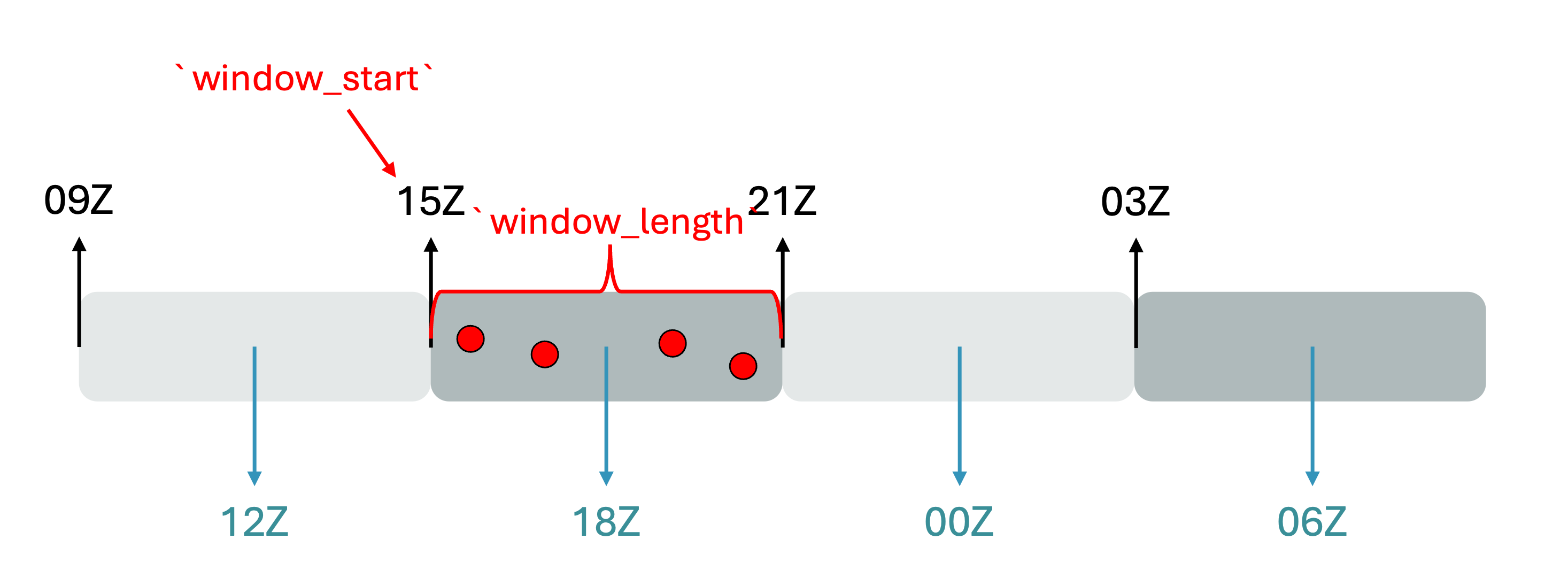
  window_start='20251015T210000Z',
  window_length='PT6H',
  target_file='obs_tempo_no2_tropo.nc4', # save the file under target_file name
  file_extension='nc4'
  )
Configuring ingest_obs_cf
The ingest_obs_cf block in suite_config.py includes the default values. To configure and customize the experiment use an override file. See Getting Started for more details.
experiment_id: training_ingest_obs # Swell experiment_id, this doesn't impact R2D2

start_cycle_point: '2025-10-10T00:00:00Z'
final_cycle_point: '2025-10-10T18:00:00Z'
model_components:
  - geos_cf
download_convert_pipeline: true # run ioda converter

models:
  geos_cf:
    jedi_build_method: use_existing
    window_length: PT6H

    obs_to_download:
      - tempo_no2_tropo
    obs_to_ingest:
      - tempo_no2_tropo
    observation_providers:
      tempo_no2_tropo: nasa_v4

    # Directory containing ioda-converter scripts if you're using something different than develop
    converter_path: /discover/nobackup/projects/jcsda/s2127/maryamao/jedi-bundle/build-intel-1.9/bin/

    # Set true for preview and false for actually saving the files to r2d2
    dry_run: false
    store_as_symlink: false # keep it false for obs
Knobs to control what to download, convert, and ingest
For each observation listed under obs_to_download and obs_to_ingest there must be an equivalent
YAML file in src/swell/configuration/jedi/interfaces/geos_cf, under download_observations, convert_observations,
and inget_observations.
download_observations/<obs>.yamlselects the remote source and granule search.convert_observations/<obs>.yamlselects the converter, output name, and converter flags.ingest_observations/<obs>.yamlidentifies the converted file to store in R2D2.
Creating and running the ingest_obs_cf
The steps are the same as any other suite (see Running the hofx_cf suite):
Load the SWELL environment. Depending on the data host you may need to set your Earthdata credentials in
~/.netrc. Follow instructions here.Create the experiment by running
swell create ingest_obs_cf -o override_obs.yaml. This will print the launch command, e.g.:
SwellCreateExperiment:
SwellCreateExperiment: Experiment successfully installed. To launch experiment use:
SwellCreateExperiment:
SwellCreateExperiment:   swell launch /discover/nobackup/mabdiosk/SwellExperiments/swell-ingest_obs_cf/swell-ingest_obs_cf-suite
SwellCreateExperiment:
Here is an example of what is in an experiment directory:
<experiment_root>/<experiment_id>/
├── configuration/
│   └── jedi/
│       └── interfaces/
│           └── geos_cf/
│               ├── download_observations/    ← where/how to get raw granules
│               ├── convert_observations/     ← how to run the IODA converter
│               ├── ingest_observations/      ← what to store in R2D2
│               ├── observations/             ← JEDI obs-space YAML templates
│               └── model/
└── <experiment_id>-suite/
    ├── flow.cylc
    ├── experiment.yaml
    └── modules
Launch it with
swell launch <path_to_suite_directory>using the path printed byswell create.
Tasks in ingest_obs_cf
With download_convert_pipeline: True, the suite runs these tasks:
Only once:
CloneJedi
BuildJediByLinking
BuildJedi
Each cycle:
DownloadObs
ConvertObsToIoda
IngestObs
What each task does
DownloadObs — For each obs in
obs_to_download, readsdownload_observations/<obs_name>.yaml(examples here) and fetches the raw files from a remote server viahttps(scraping a directory listing, auth via~/.netrc) or the NASAcmrAPI. Raw files land in<experiment_root>/<experiment_id>/run/<cycle_dir>/geos_cf/download/<obs_name>/.ConvertObsToIoda — For each obs, reads
convert_observations/<obs_name>.yaml(examples here), gathers the raw files from<experiment_root>/<experiment_id>/run/<cycle_dir>/geos_cf/download/<obs_name>/, and runs the ioda-converter script (fromconverter_path). The IODA output is written to<experiment_root>/<experiment_id>/run/<cycle_dir>/geos_cf/ioda/<obs_name>/.IngestObs — Reads per-observation metadata from
configuration/jedi/interfaces/<model>/ingest_observations/<obs_name>.yaml(examples here), resolves the file path for the cycle, and stores the file in R2D2 as anobservationitem (keyed by provider, observation type, file extension, and DA window, etc.).
All of DownloadObs, ConvertObsToIoda, and IngestObs honor dry_run: true, in which case they
log what they would do without touching the network or R2D2.
Exploring log and run directories
Same layout as other suites (see Running the hofx_cf suite):
Run directory — per cycle/model under
<experiment_root>/<experiment_id>/run/<YYYYMMDDTHHMMSSZ>/<model_component>/. For this pipeline that includesdownload/<obs_name>/(raw files) andioda/<obs_name>/(converted IODA files).Log directory — cylc job logs under
~/cylc-run/<experiment_name>/log/job/<cycle_point>/<task_name>/<submit_num>/withjob.outandjob.err. This is the first place to look whenDownloadObs(network) orConvertObsToIoda(converter) fails.
Final output
The deliverable is IODA-format observation files registered/stored in R2D2. IngestObs calls
r2d2.store(item='observation', observation_type=<obs_name>, ...) for the current cycle’s window, so
after a successful run the observations are available in R2D2 for any suite (e.g. hofx_cf’s
GetObservations) to r2d2.fetch by provider, observation type, file extension, and window.
Set dry_run: true to validate the pipeline end-to-end without writing anything to
R2D2.