The ingest_background_cf registers GEOS-CF background files that already exist on the CSS shared
filesystem in R2D2, so that downstream suites such as hofx_cf can retrieve them
with GetBackground. It is a simpler workflow than ingest_obs_cf: it does not download, convert,
or modify anything. It finds each hourly file, checks that it exists, and stores its metadata in
R2D2, normally as a symlink rather than as another copy.
As described in r2d2_ingest suite, and like
ingest_obs_cf, ingest_background_cf is not a separate suite directory. It
is a configuration of the shared
r2d2_ingest suite
that sets ingest_background_pipeline: true, which selects the SaveBackground branch of the shared
flow.cylc.
Here is a list of R2D2 keys used for item='forecast' (see
r2d2_ingest suite for the full item reference):
import r2d2

# r2d2.fetch to get the data from R2D2 or r2d2.store to save the data on R2D2
r2d2.fetch(
  item='forecast',
  model='geos_cf', # other options include cice6 and mom6
  experiment='swell_test', # r2d2_experiment_id
  resolution='c90',
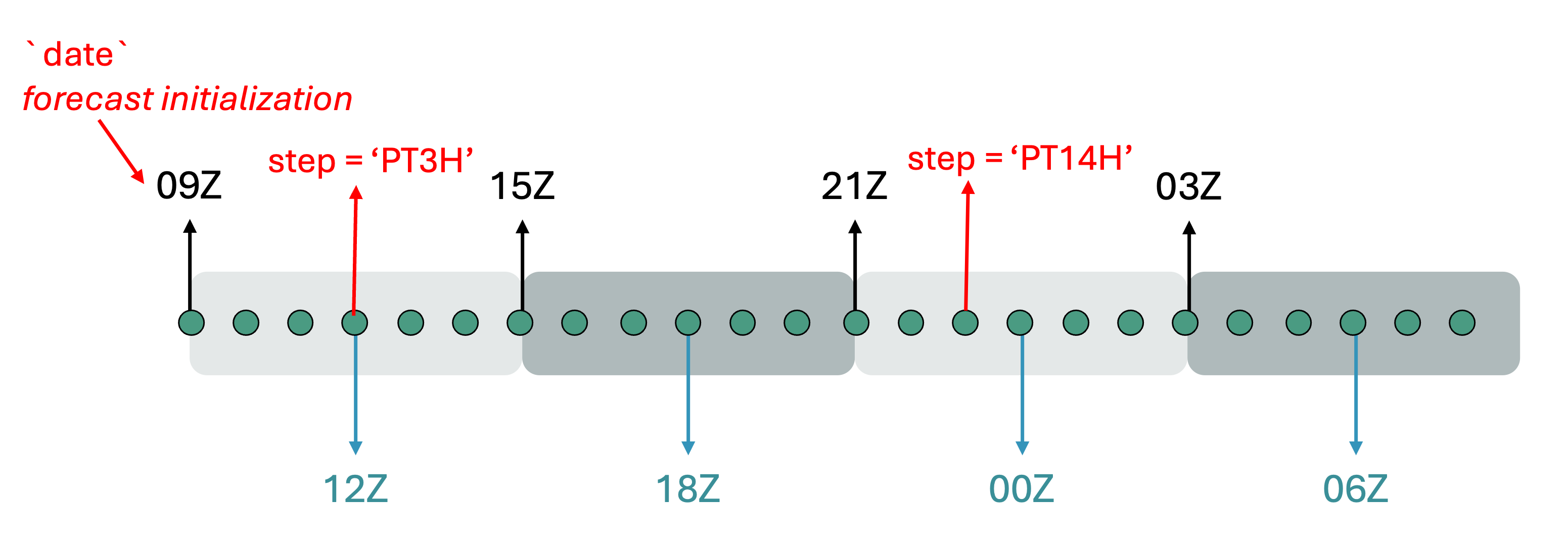
  step='PT3H', # forecast lead time, the elapsed duration from the forecast initialization time (`date`). Forecast valid_time = date + step
  date='2023-08-05T09:00:00Z',
  file_extension='nc', # this is not a very consistent key and may be deprecated at some point
  target_file='bkg.20230805T120000Z.nc4'
  )
The 09Z convention for geos_cf_oper
ingest_background_cf is designed to ingest the jdi collection from the GEOS-CFv2 operational
run, so a few assumptions about that collection are currently hard-coded. GEOS-CFv2 runs one
forecast per day, initialized at 09Z, and the collection holds 24 hourly files from it. The suite
therefore treats the cycle point as the forecast initialization time and derives the R2D2 step
as the offset from 09Z:
| R2D2 step | Valid time for a 2025-10-02 09Z cycle |
|---|---|
PT0H | 2025-10-02 09Z |
PT1H | 2025-10-02 10Z |
| ... | ... |
PT15H | 2025-10-03 00Z |
PT23H | 2025-10-03 08Z |
Because of this, start_cycle_point and final_cycle_point must be at 09Z, and cycle_times must
stay ['T09']. SaveBackground checks the cycle hour and aborts with an explanatory message if it
receives anything else. This may change in the future if other collections need to be ingested.
Configuring ingest_background_cf
The ingest_background_cf block in
suite_config.py
includes the default values. To configure and customize the experiment use an override file. See
Getting Started for more details.
experiment_id: training_ingest_background # Swell experiment_id, this doesn't impact R2D2

start_cycle_point: '2025-10-10T09:00:00Z' # first 09Z forecast initialization to ingest
final_cycle_point: '2025-10-10T09:00:00Z' # last 09Z forecast initialization to ingest
cycle_times: ['T09'] # default; must stay T09
model_components:
  - geos_cf
ingest_background_pipeline: true # run the SaveBackground branch

models:
  geos_cf:
    # The default already points at the GEOS-CFv2 jdi collection,
    # so you normally do not need to set this.
    background_source_path: /css/gmao/geos-cf/NRTv2/priv/ana/Y%Y/M%m/D%d/GEOS.cf.ana.jdi_inst_1hr_glo_C360x360x6_v72.%Y%m%d_%H%Mz.R0.nc4
    background_experiment: geos_cf_oper # R2D2 experiment name for the GEOS-CFv2 jdi collection
    horizontal_resolution: c360 # GEOS-CFv2 resolution is c360

    # Set true for preview and false for actually saving the files to r2d2
    dry_run: false
    store_as_symlink: true # keep it true for backgrounds, so no data is copied
Most of these are already the defaults: cycle_times: ['T09'], background_experiment: geos_cf_oper, horizontal_resolution: c360, store_as_symlink: true, and the
background_source_path
template. In practice you only need to set experiment_id, the cycle points, and dry_run. They
are all listed above so you can see the full set of keys that control the ingest.
Note that dry_run defaults to true, so a bare swell create ingest_background_cf gives you a
preview run: it checks which source files exist and logs the R2D2 operations it would perform
without storing anything. That is a good first thing to run.
Creating and running the ingest_background_cf
The steps are the same as any other suite (see Running the hofx_cf suite):
Load the SWELL environment and make sure your R2D2 credentials are set (see Getting Started). No Earthdata credentials are needed here, since nothing is downloaded.
Create the experiment by running
swell create ingest_background_cf -o override_background.yaml. This will print the launch command, e.g.:
SwellCreateExperiment:
SwellCreateExperiment: Experiment successfully installed. To launch experiment use:
SwellCreateExperiment:
SwellCreateExperiment:   swell launch /discover/nobackup/mabdiosk/SwellExperiments/swell-ingest_background_cf/swell-ingest_background_cf-suite
SwellCreateExperiment:
Here is an example of what is in an experiment directory:
<experiment_root>/<experiment_id>/
├── configuration/
└── <experiment_id>-suite/
    ├── flow.cylc
    ├── experiment.yaml                    ← the only file SaveBackground reads
    └── modules
swell create copies the whole configuration/ tree, but unlike ingest_obs_cf this workflow has
no per-item YAML files to read: everything SaveBackground needs comes from experiment.yaml.
Launch it with
swell launch <path_to_suite_directory>using the path printed byswell create.
Tasks in ingest_background_cf
With ingest_background_pipeline: true, the suite runs a single task:
Only once:
(none — there is no JEDI clone or build, because no executable is run)
Each cycle:
SaveBackground
What each task does
SaveBackground — Reads the source path template and R2D2 keys from
experiment.yaml, loops over the 24 hourly steps of the 09Z forecast, and stores each existing file in R2D2 as aforecastitem. The implementation lives insrc/swell/tasks/save_background.py.For each cycle it:
Loads the user’s R2D2 credentials.
Verifies that the forecast initialization hour is 09Z, and aborts if it is not.
Loops from hour offset 0 through 23.
Calculates the valid time and R2D2 step (
PT0HthroughPT23H).Expands
background_source_pathfor that valid time.Checks that the source file exists. Missing files generate warnings and are skipped.
In dry-run mode, logs what would be stored. Otherwise, calls
r2d2.store().Reports the numbers of stored and skipped files.
Each real store uses these R2D2 keys:
r2d2.store(
    item='forecast',
    model='geos_cf',
    experiment='geos_cf_oper',
    resolution=horizontal_resolution,
    date=forecast_start,   # the 09Z forecast initialization
    step='PT0H',           # changes for each hourly file: PT0H ... PT23H
    file_type='bkg',
    file_extension='nc4',
    source_file=source_file,
    store_as_symlink=store_as_symlink,
)
Notice that the R2D2 date represents the 09Z forecast initialization, while step locates
the hourly valid time within that forecast.
Like the obs ingest tasks, SaveBackground honors dry_run: true, in which case it logs what it
would store without writing anything to R2D2. It still checks that each source file exists, so a
dry run reports only the files that are actually present.
background_experiment versus r2d2_experiment_id
SaveBackground stores files under background_experiment; it does not use the workflow’s
r2d2_experiment_id. For example, with:
experiment_id: swell-ingest_background_cf
r2d2_experiment_id: swell-ingest_background_cf-a1b2c3d4
models:
  geos_cf:
    background_experiment: geos_cf_oper
the local workflow is named swell-ingest_background_cf, but the background files are indexed in
R2D2 under geos_cf_oper. A downstream hofx_cf experiment must use the same value:
models:
  geos_cf:
    background_experiment: geos_cf_oper
    horizontal_resolution: c360
GetBackground then fetches item='forecast', model='geos_cf', file_type='bkg', and the
matching experiment, resolution, initialization date, and step.
For example, a 3D hofx_cf cycle at 18Z with window_length: PT6H computes a 09Z forecast
initialization and requests PT9H. That key selects the file valid at 18Z from the 24-file set
registered by the 09Z ingest cycle.
Exploring log and run directories
Same layout as other suites (see Running the hofx_cf suite):
Run directory — per cycle/model under
<experiment_root>/<experiment_id>/run/<YYYYMMDDTHHMMSSZ>/<model_component>/. The task base creates this directory as usual, butSaveBackgroundreads directly from the configured shared path and does not stage the background files there, so it stays essentially empty.Log directory — cylc job logs under
~/cylc-run/<experiment_name>/log/job/<cycle_point>/SaveBackground-geos_cf/<submit_num>/withjob.outandjob.err. Checkjob.outfor each resolved source filename and the final stored/skipped counts, andjob.errfor failures. This is the first place to look when the ingest does not produce what you expect.
Common problems are:
The task aborts immediately: the cycle hour is not 09Z. Keep
cycle_times: ['T09']and use 09Z start/final cycle points.Files are skipped: compare the expanded path in
job.outwith the CSS directory.A downstream suite cannot fetch the files: make sure
background_experiment,horizontal_resolution, model, file type, initialization time, and step match the stored keys.A symlink store reports a permission warning: the task contains a workaround for an R2D2
chmodissue. It continues only after verifying that the created symlink points to the expected source; any otherPermissionErroris raised normally.
Final output
The deliverable is GEOS-CF background files registered in R2D2 as forecast items. A successful
non-dry run registers up to 24 items per 09Z cycle. With store_as_symlink: true, the R2D2
datastore contains links to the authoritative CSS files rather than duplicate NetCDF files. These
registered backgrounds are then ready for hofx_cf and other GEOS-CF workflows to retrieve through
GetBackground.
Set dry_run: true to validate the pipeline end-to-end without writing anything to R2D2.
Together, the two ingest configurations satisfy the input side of the HofX workflow contract:
ingest_obs_cf        → R2D2 observation → GetObservations ─┐
                                                           ├─► RunJediHofxExecutable
ingest_background_cf → R2D2 forecast    → GetBackground   ─┘
The producer and consumer configurations must agree on the relevant R2D2 keys. For observations, that includes the provider, observation type, file extension, and window. For backgrounds, it includes the model, background experiment, resolution, initialization date, step, file type, and file extension. Once those contracts match, the HofX configuration does not need to know the physical source paths used by either ingest workflow.
SaveBackground vs. SaveForecastCf, and GetBackground
Swell has two tasks that write item='forecast' into R2D2, and one task that reads it back.
It is easy to confuse the two writers because they store the same item and the same file_type='bkg',
but they exist for different reasons and are used by different suites.
SaveBackgroundregisters backgrounds that someone else already produced — the GEOS-CFv2 operationaljdicollection sitting on CSS. This is the task run byingest_background_cf.SaveForecastCfregisters backgrounds that swell itself just produced by running the GEOS-CF model. It runs at the end of every cycle of3dvar_cf_cycle, right afterRunForecast.GetBackgroundis the consumer, and it has to be able to read files written by either of them.
Side-by-side
SaveBackground | SaveForecastCf | |
|---|---|---|
| Suite | r2d2_ingest / ingest_background_cf | 3dvar_cf_cycle (after RunForecast) |
| Source of the data | external, pre-existing files on CSS | files written by this experiment’s forecast |
| Where it reads from | background_source_path strftime template | <cycle_dir>/scratch/CF2.geoscf_jedi.<time>.nc4 |
R2D2 experiment | background_experiment (e.g. geos_cf_oper) | r2d2_experiment_id (this experiment’s own id) |
R2D2 date | the 09Z forecast initialization = cycle time | window_begin = cycle time − ½ window_length |
R2D2 step | fixed PT0H … PT23H (24 hourly steps) | forecast_output_frequency … forecast_length |
file_extension | nc4 | nc |
store_as_symlink | True by default (no data copied) | always False (a real copy) |
| Missing source file | warns and skips, keeps going | aborts the task |
| Dry-run support | yes (dry_run) | no |
Two consequences worth internalizing:
SaveForecastCf’s step list starts at one output interval, not atPT0H. The loop insave_forecast_cf.py:60-85begins atstep_dur = forecast_frequency_dur, so withforecast_output_frequency: PT1Hthe first stored step isPT1H.SaveBackgrounddoes storePT0H, because the 09Z analysis file itself is part of the collection.SaveBackgroundis deliberately forgiving andSaveForecastCfis deliberately strict. A gap in the NRT archive is a normal, external fact you want logged and skipped; a missing forecast file means the cycle you just ran is broken, so it fails loudly.
The two modes of GetBackground
GetBackground picks its R2D2 keys in two different ways, and the switch is not a user-facing
option — it is inferred from the configuration.
Which experiment to fetch from is decided at
get_background.py:77-80:
if self.cycle_time_dto() != self.start_cycle_point_dto() and 'cycle' in self.suite_name():
    background_experiment = self.config.r2d2_experiment_id()
else:
    background_experiment = self.config.background_experiment()
So in a cycling suite (one whose name contains cycle, such as 3dvar_cf_cycle), only the first
cycle reads the ingested geos_cf_oper backgrounds. Every later cycle reads its own
r2d2_experiment_id, i.e. the forecast that SaveForecastCf stored one cycle earlier. In a
non-cycling suite such as hofx_cf or 3dvar_cf, the condition is never true and every cycle uses
background_experiment.
Which date and step to request then follows from that choice, at
get_background.py:148-204:
use_geos_cf_oper_background = (
    model_component == 'geos_cf'
    and background_experiment == 'geos_cf_oper'
)
GEOS-CF operational mode (
use_geos_cf_oper_backgroundis true). The helpersgeos_cf_oper_forecast_startandgeos_cf_oper_stepre-derive the keys against the fixed 09Z initialization: they snap the valid time back to the most recent 09Z (going back a day if the valid time is before 09Z) and express the offset asPT<n>H.file_extensionis forced tonc4. These two helpers exist purely to reproduce, on the fetch side, the convention thatSaveBackgroundhard-codes on the store side — the docstring ofgeos_cf_oper_stepsays as much: “Return a GEOS-CF v2 R2D2 step string matching SaveBackground.”Standard swell mode (anything else). The forecast start is the generic swell one,
forecast_start_time = cycle_time − window_length + forecast_offset, andfile_extensionis derived fromfile_type. This is the path that lines up withSaveForecastCf.