SWELL is a workflow layer that organizes and runs tasks within an experiment. These tasks include creating a run directory for each assimilation window; copying or linking observations, backgrounds, and other input files into that directory; building JEDI input YAML files; running JEDI executables; and handling JEDI or model output files.
SWELL uses Cylc to manage dependencies among tasks. The order in which the tasks run is usually
defined in a file called flow.cylc.
Below is an example from the Cylc GUI for a hofx_cf experiment:
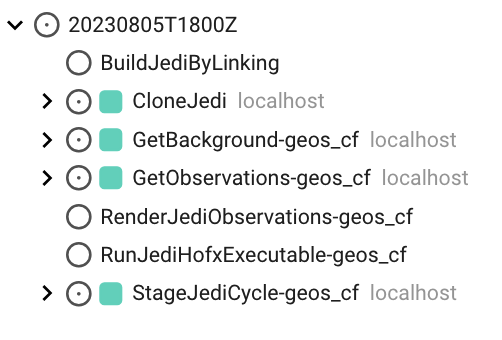
Note: In the Cylc GUI and TUI, tasks are listed alphabetically rather than by execution order or status.
More information about the JEDI HofX application is available in the previous JEDI lecture.
For each cycle, SWELL creates a run directory and stages the static inputs with
StageJediCycle-geos_cf. It copies or links backgrounds and observations into the run directory
with GetBackground-geos_cf and GetObservations-geos_cf, then creates the JEDI YAML configuration
with RenderJediObservations-geos_cf. Next, RunJediHofxExecutable-geos_cf runs the JEDI HofX
application. Finally, SaveObsDiags-geos_cf stores the feedback files, and EvaObservations-geos_cf
generates diagnostics. As SWELL moves through the workflow, each task’s box changes color to show
whether the task is queued, running, or finished.
In the example below, the tasks with green boxes have completed successfully, and the task with a blue box is running:
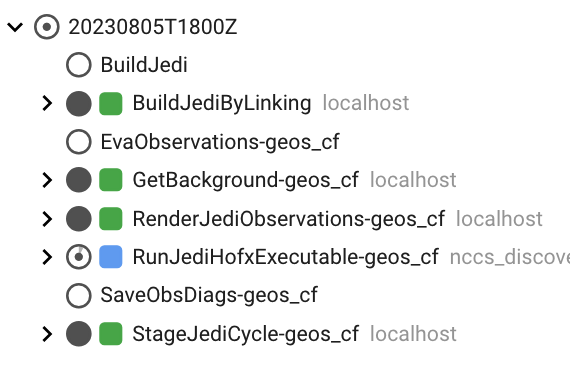
Learn more about Cylc job states in the Cylc documentation.
Tasks
SWELL tasks are Python classes located in
src/swell/tasks. The table below
lists the tasks in the hofx_cf suite and their responsibilities.
| Task | Responsibility |
|---|---|
CloneJedi | Clones the JEDI source repositories |
BuildJediByLinking | Links to an existing build (fast path) |
BuildJedi | Compiles JEDI if linking to an existing build fails (slow path) |
GetBackground | Fetches the forecast files needed for the cycle from R2D2 |
GetObservations | Fetches the observation files from R2D2 |
RenderJediObservations | Fills in the observation-space YAML templates |
StageJediCycle | Stages static files such as coefficients and geometry files |
RunJediHofxExecutable | Runs JEDI under SLURM |
EvaObservations | Generates diagnostic plots and statistics |
SaveObsDiags | Stores the feedback files in R2D2 |
CleanCycle | Deletes large intermediate files |
You can also run any task manually, which is particularly useful when debugging:
swell task GetObservations $config -d $datetime -m geos_cfSuites, suite configurations, and experiments
A suite is a predefined workflow that describes the tasks required to perform a particular operation or experiment.
All SWELL suites are located in
src/swell/suites/. This directory
contains suites for workflows such as 3D-Var, HofX, and data ingestion. Each
suite directory contains a flow.cylc file, which defines the task dependency graph, and a
suite_config.py file, which defines one or more suite configurations. Suites that produce
diagnostic plots may also contain an eva directory with EVA YAML files.
An experiment is the runnable workflow produced by the swell create command. It is a directory
on disk containing a rendered experiment.yaml, a copy of the configuration tree, and a Cylc
workflow that is ready to launch.
You can create a hofx_cf experiment by running:
swell create hofx_cfNote: Running swell create without a suite name prints the available suites.
Here is an abbreviated example of the contents of an experiment directory:
<experiment_root>/swell-hofx_cf/
├── configuration/
│   └── jedi/
│       └── interfaces/
│           └── geos_cf/
│               ├── suite_questions.yaml
│               ├── task_questions.yaml
│               ├── ...
│               └── observations/
└── swell-hofx_cf-suite/
    ├── eva/
    │   └── observations-geos_cf.yaml   ← EVA diagnostics configuration
    ├── experiment.yaml                 ← the rendered experiment settings
    ├── flow.cylc                       ← the rendered Cylc task graph
    └── modules                         ← source this to run tasks by hand
If you need to modify configuration files after running swell create, edit the copies under
<experiment_root>/<experiment_id>/configuration/, not the files in the SWELL source tree. Cylc
uses the configuration stored in the experiment directory when it runs the workflow.
Next Step:
In the next lecture, we cover installing SWELL and configuring an experiment.