The hofx_cf suite runs the
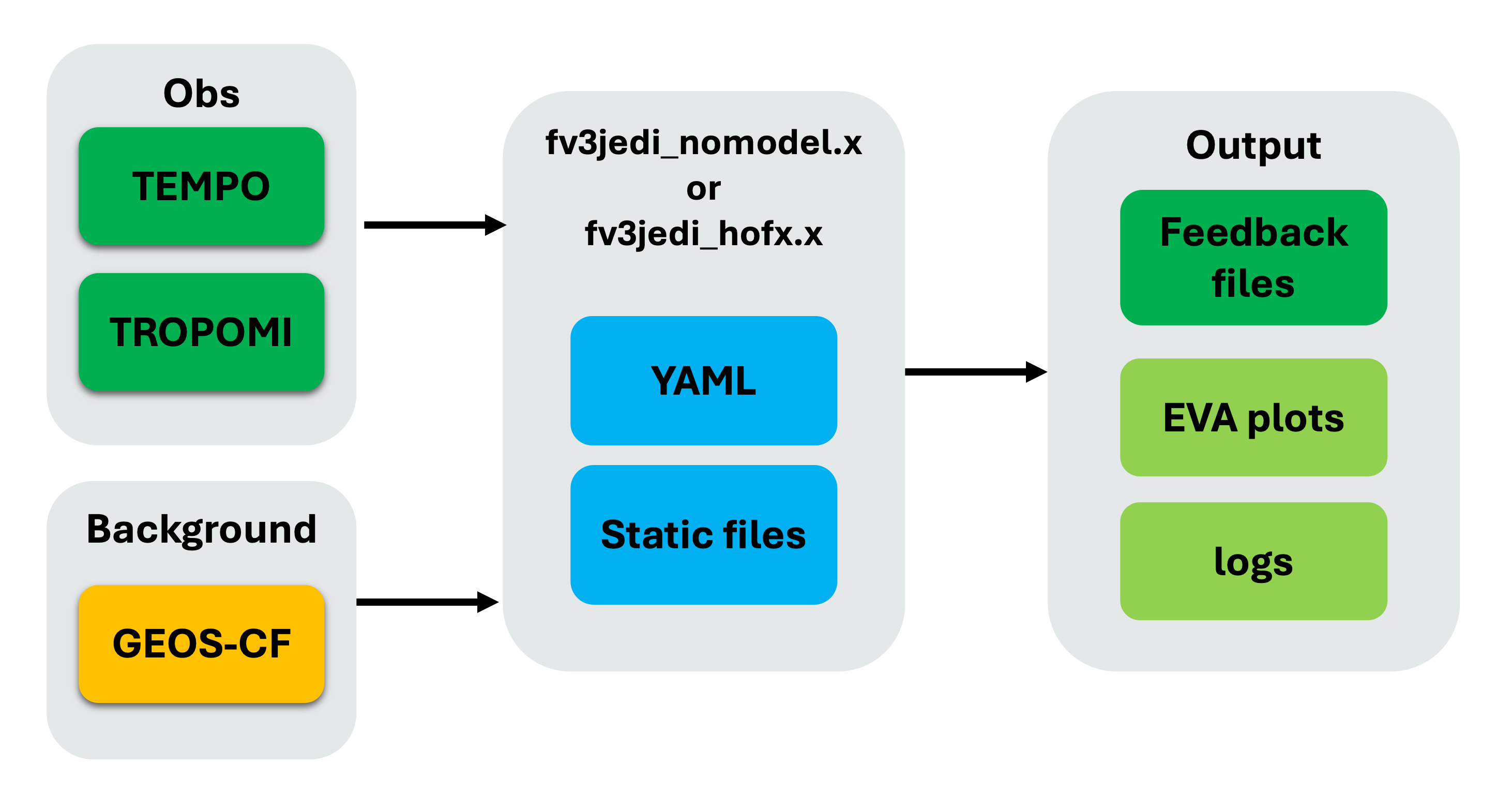
JEDI HofX application with the GEOS-CF
(composition forecast) interface. The application requires background, observation, and static
input files. Its
HofX YAML configuration
specifies information such as input filenames, model resolution, and the data-assimilation window.
Based on the experiment configuration, SWELL creates a cycle-specific run directory, copies or
links the background and observation files, stages the static files, and renders the HofX YAML from
templates. The workflow then runs the fv3jedi_hofx_nomodel.x executable. Finally, it handles the
IODA observation-space feedback files and runs EVA to generate diagnostics.
Task dependencies
The tasks and dependencies for the hofx_cf suite are defined in
src/swell/suites/hofx_cf/flow.cylc.
The file has two main sections: [scheduling], which defines the task graph, and [runtime], which
defines how each task runs.
Under [scheduling][[graph]], the => operator creates a success trigger: the task on the right can
start only after the task on the left succeeds. For example:
GetObservations-{{model_component}} => RenderJediObservations-{{model_component}}This line means that GetObservations must succeed before RenderJediObservations can start. The
suite also uses the following Cylc syntax:
?marks an optional output, so the graph does not stall if that output is not produced. For example,BuildJediByLinking?is optional because the workflow can build JEDI instead.:fail?creates an optional failure trigger. The expressionBuildJediByLinking:fail? => BuildJeditells Cylc to build JEDI from source if linking to an existing build fails.|is a logical OR. InBuildJediByLinking[^]? | BuildJedi[^] => RunJediHofxExecutable, the executable can start after either build path completes.[^]refers to the task instance at the initial cycle point. This allows the one-time build tasks to satisfy dependencies in every cycle.
The graph is split into two parts: an R1 block for tasks that run once, such as cloning and
building JEDI, and a per-cycle block generated from cycle_times and model_components with
Jinja2. Because hofx_cf uses one model component, geos_cf, each cycle-dependent task is named
<Task>-geos_cf.
The [runtime] section maps these graph names to swell task commands and defines settings such as
the execution platform, time limit, and SLURM directives.
What each task does
CloneJedi — Clones the JEDI source through
jedi_bundleor links to an existing source directory, depending onjedi_build_method.BuildJediByLinking — Links to an existing JEDI build directory. This is the fast path used by
use_existinganduse_pinned_existing.BuildJedi — Compiles JEDI from source with
jedi_bundlewhen an existing build cannot be linked. This task runs on a compute node with its own SLURM directives.GetBackground — Fetches the background fields for the cycle from R2D2.
GetObservations — Fetches the observation files for the cycle from R2D2. Depending on the configuration, a missing observation may be replaced with an empty file so that the run can continue.
StageJediCycle — Stages the cycle-dependent static files defined by
configuration/jedi/interfaces/<model>/model/stage_cycle.py, resolving settings such as the horizontal and vertical resolutions.RenderJediObservations — Renders the per-observation JEDI YAML, including observation spaces, window parameters, and any required coefficients, into the cycle directory.
RunJediHofxExecutable — Assembles the complete HofX YAML and runs the JEDI executable. This is the main compute task and runs on a compute node with SLURM directives.
EvaObservations — Runs EVA (Evaluation and Verification of the Analysis) on the observation-space output to produce diagnostic plots and statistics.
SaveObsDiags — Stores the observation feedback files in R2D2. This task is included in the graph only when R2D2 is enabled—that is, when the experiment is not created with
--skip-r2d2.CleanCycle — Removes large intermediate files matching
clean_patternsafter EVA and, when applicable, the R2D2 save have completed.
Exploring the run and log directories
The experiment files are stored under <experiment_root>/<experiment_id>. For example:
/discover/nobackup/$USER/SwellExperiments/swell-hofx_cfRun directory
Tasks that receive a cycle and model component write to a cycle-specific directory:
<experiment_root>/<experiment_id>/run/<YYYYMMDDTHHMMSSZ>/<model_component>/For example:
.../swell-hofx_cf/run/20230805T180000Z/geos_cf/This directory contains the fetched background and observation files, rendered JEDI YAML, HofX
log, feedback files, and EVA output. CleanCycle later removes the large files that match the
configured cleanup patterns.
Log directory
Cylc keeps its workflow and job logs under ~/cylc-run/<experiment_name>/. The standard output and
standard error for each task instance are stored under:
~/cylc-run/<experiment_name>/log/job/<cycle_point>/<task_name>/<submit_num>/Each directory contains job.out, which includes SWELL task logging, and job.err. This is the
first place to look when a task turns red in cylc tui.
To avoid using space in $HOME, you can place the cylc-run directory under
/discover/nobackup/$USER/SwellExperiments/ and create a symbolic link to it from $HOME.
Final outputs
The primary outputs of hofx_cf are the observation-space feedback files, also called H(x)
diagnostic files, produced by RunJediHofxExecutable. The suite also produces EVA diagnostics with
EvaObservations.
The feedback files are first written to the cycle’s run directory. When R2D2 is enabled,
SaveObsDiags stores them as R2D2 feedback items using the R2D2 experiment ID, observation type,
and data-assimilation window (window_start and window_length). CleanCycle may subsequently
remove the local copies according to clean_patterns.
Fetching feedback files later
Because the feedback files are stored in R2D2, you can retrieve them after the run or from another
experiment with the r2d2 utility. Fetch the feedback item using the matching R2D2 experiment ID,
observation type, window start, and window length.
About experiment_id and r2d2_experiment_id
These settings identify the same workflow in different places:
experiment_idis SWELL’s local name for the experiment. It determines the experiment directory (<experiment_root>/<experiment_id>), suite directory (<experiment_id>-suite), and names used in local files and configuration.r2d2_experiment_idis the name registered in R2D2. Tasks that save products, such asSaveObsDiags, use it as the R2D2experimentkey. Cycling suites also use it when fetching products generated by earlier cycles.
By default, both IDs begin with the suite-derived name, which is swell-hofx_cf for this suite.
R2D2 experiment names must be unique, so swell create checks whether the requested name is already
registered. If it is, SWELL appends a random eight-character hexadecimal suffix.
The final values are recorded in the generated configuration:
/discover/nobackup/${USER}/SwellExperiments/swell-hofx_cf/swell-hofx_cf-suite/experiment.yamlFor example:
experiment_id: swell-hofx_cf
r2d2_experiment_id: swell-hofx_cf-04338501
In this example, the local files remain under swell-hofx_cf, while the feedback files are stored
in R2D2 under swell-hofx_cf-04338501. When fetching feedback later, use the final
r2d2_experiment_id recorded in experiment.yaml, which may differ from the local
experiment_id.
Running with an override file
As described in Getting Started, reusable override files are stored in the
swell-config repository so that configuration changes
can be tracked and shared.
The following override_hofx.yaml configures two six-hourly cycles:
# Use with: swell create hofx_cf -o override_hofx.yaml

experiment_id: training_hofx_cf

# SWELL appends a hexadecimal suffix if this R2D2 ID is already registered.
r2d2_experiment_id: training_hofx_cf

start_cycle_point: '2025-10-10T12:00:00Z'
final_cycle_point: '2025-10-10T18:00:00Z'

model_components:
  - geos_cf

models:
  geos_cf:
    jedi_build_method: use_existing
    check_for_obs: false
    window_length: PT6H
    window_type: 3D

    # Must match the background experiment stored in R2D2.
    background_experiment: geos_cf_oper
    background_time_offset: PT9H
    horizontal_resolution: c360
    vertical_resolution: 72
    npx: 361
    npy: 361

    # Must match the observations stored in R2D2.
    observations:
      - tempo_no2_tropo

    observation_providers:
      tempo_no2_tropo: nasa_v4

    clean_patterns:
    #- '*.nc4'
    - '*.txt'
    - logfile.*.out
Create the experiment with:
swell create hofx_cf -o override_hofx.yamlThe experiment is installed under
/discover/nobackup/${USER}/SwellExperiments/<experiment_id>. Launch it using the command printed by
swell create:
swell launch <path_printed_by_swell_create>Each hofx_cf cycle is independent of the previous cycle, so multiple cycles may run concurrently,
subject to the Cylc runahead limit and the availability of compute resources.