Prerequisite
Please review here to learn about setting up your work environment and configuring the jedi-bundle.
Before starting, verify:
$JEDI_BUILDenvironment variable is setfv3jedi_hofx_nomodel.xexists at$JEDI_BUILD/fv3jedi_hofx.xInput files exist in the
jedi_applications/run_hofx/hofx/inputsdirectory (background, observation, and auxiliary files such as geometry configurations)You have access to compute resources (interactive node or batch system)
Introducton:
In HofX4D we want to compute H(x) at appropriate observation time. For this a model needs to be included into the procedure and at each model time step (step in the figure below) the observaiton operator is applied for the observations that fall into the current time.
There are two ways of performing HofX4D in JEDI:
A. Actually running the model within the JEDI execution, but as you can imagine this can be very intricate and computationally demanding with large Earth System Models. In this tutorial we show this capability with the simplified FV3 linear model name: FV3LM in the yaml below.
B. Running the model beforehand and saving outputs at a given time frequency then JEDI will pick up these files and use them as backgrounds. In JEDI, this is called a pseudo model name: PSEUDO
The JEDI executable for the HofX4D application is fv3jedi_hofx.x
HofX4D graphic representation
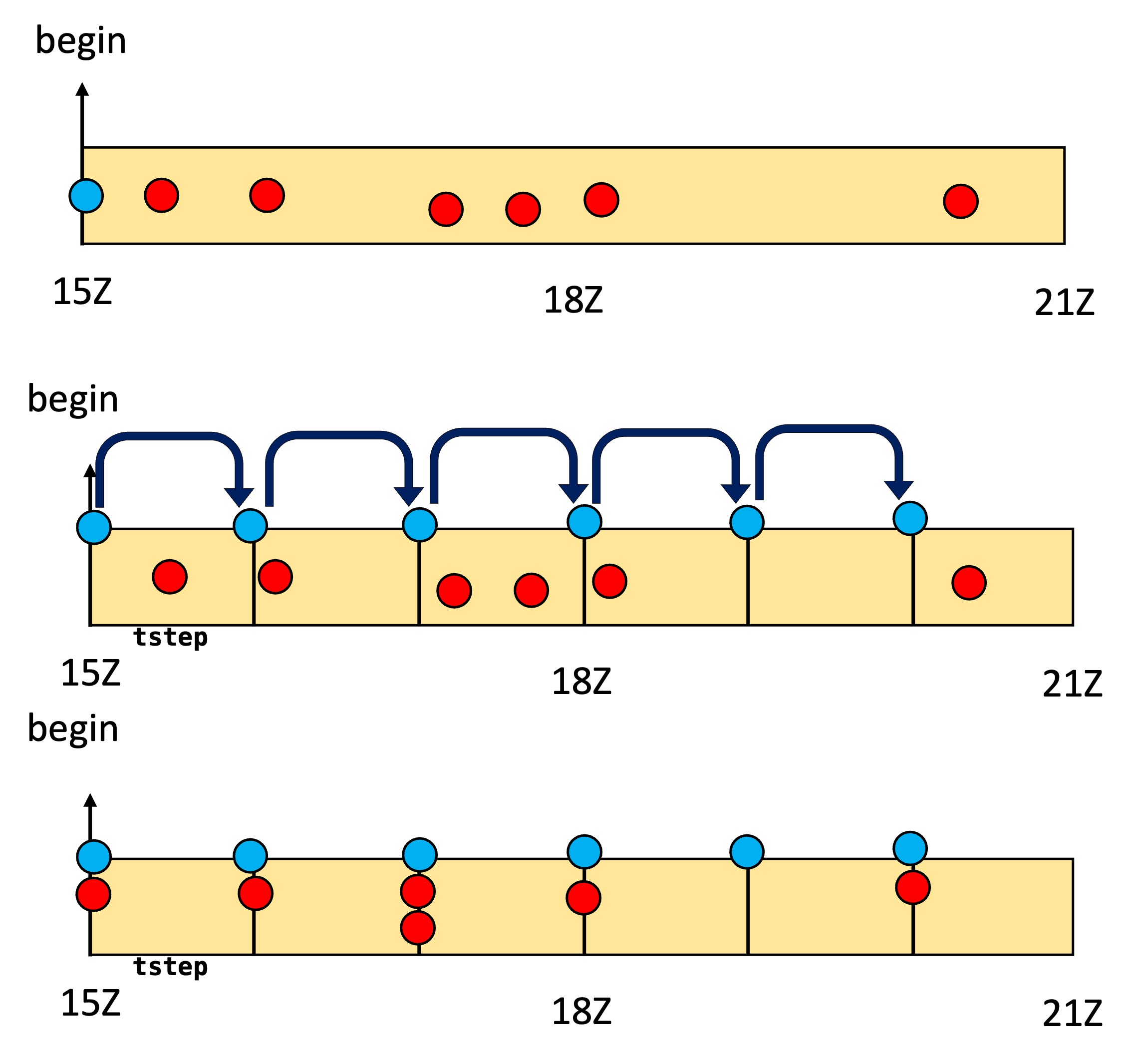
HofX4D with FV3LM model:
YAML structure of HofX4D with FV3LM model:
To run fv3jedi_hofx.x, JEDI requires in input file (in YAML format) which specifies the assimilation window, input geometry and state information, input observation information, and the observation operator. Below is an example to run the Column Retrieval observation operation with TEMPO observation and a low resolution GEOS-CF background.
# Beginning and length of assimilation window
time window:
  begin: '2023-08-05T15:00:00Z'
  length: PT6H
forecast length: PT6H

# Geometry of the state or background
geometry:
  fms initialization:
    namelist filename: inputs/geometry_input/fmsmpp.nml
  akbk: inputs/geometry_input/akbk72.nc4
  npx: 13
  npy: 13
  npz: 72
  field metadata override: inputs/geometry_input/geos.yaml

# Simplified linear model used to move the state forward in time
model:
  name: FV3LM
  namelist filename: inputs/geometry_input/input_geos_c12.nml
  tstep: PT15M
  lm_do_dyn: 1
  lm_do_trb: 0
  lm_do_mst: 0
  initialize model from A-Grid winds: true
  model variables:
  - air_pressure_thickness
  - volume_mixing_ratio_of_no2
  - volume_mixing_ratio_of_no
  - volume_mixing_ratio_of_o3
  - eastward_wind
  - northward_wind
  - air_temperature
  - geopotential_height_times_gravity_at_surface
  - water_vapor_mixing_ratio_wrt_moist_air

# Initial condition valid at the beginning of the window
initial condition:
  datetime: '2023-08-05T15:00:00Z'
  filetype: cube sphere history
  datapath: inputs/geos_cf_c12
  filename:  CF2.geoscf_jedi.c12.20230805T150000Z.nc4
  state variables:
  - air_pressure_thickness
  - volume_mixing_ratio_of_no2
  - volume_mixing_ratio_of_no
  - volume_mixing_ratio_of_o3
  - eastward_wind
  - northward_wind
  - air_temperature
  - geopotential_height_times_gravity_at_surface
  - water_vapor_mixing_ratio_wrt_moist_air

  field io names:
    air_pressure_thickness: DELP
    volume_mixing_ratio_of_no: 'NO'
    volume_mixing_ratio_of_no2: NO2
    volume_mixing_ratio_of_o3: O3
    air_pressure_at_surface: PS
    eastward_wind: ua
    northward_wind: va
    air_temperature: T
    geopotential_height_times_gravity_at_surface: phis
    water_vapor_mixing_ratio_wrt_moist_air: SPHU

# Observation and observation operator information
observations:
  observers:
  - obs space:
      name: tempo_no2_tropo
      obsdatain:
        engine:
          obsfile: inputs/obs/tempo_no2_tropo_20230805T150000Z.nc
          type: H5File
      obsdataout:
        engine:
          allow overwrite: true
          obsfile: output/fb.hofx4d.tempo_no2_tropo.20230805T150000Z.nc
          type: H5File
      observed variables:
      - nitrogendioxideColumn
      simulated variables:
      - nitrogendioxideColumn
    obs operator:
      name: ColumnRetrieval
      isApriori: false
      isAveragingKernel: true
      nlayers_retrieval: 72
      stretchVertices: topbottom
      tracer variables:
      - volume_mixing_ratio_of_no2
A few points about this experiment’s YAML file:
When comparing HofX3D and HofX4D YAMLs, note that the
state:section is replaced bymodel:andinitial condition:sections.In this example, the
FV3LMmodel is used as the “simplified model”. This is a linearized version of the FV3 dynamical core. More information about fv3-jedi-linearmodel here.The initial condition is valid at the beginning of the window.
tstepis set to 15 minutes, meaning that there will be a model state available every 15 minutes. These states are computed by running theFV3LMmodel.
Running HofX4D with FV3LM model
$MPIEXEC "-n" "6" $JEDI_BUILD/fv3jedi_hofx.x yamls/hofx_fv3-geos_cf_fv3lm.yaml 2>&1 | tee log_hofx4d_fv3lm.txtOn Discover, you will need to run this command on an interactive node or submit it as a Slurm job. Please see here for more details.
Examining the output of HofX4D run
Like the HofX3D exercise, you can view the output log and take note of the cost of each elements in the JEDI execution. The output file has a similar format to the output file from the HofX3D exercise.
HofX4D with PSEUDO model:
YAML structure of HofX4D with PSEUDO model:
time window:
  begin: '2023-08-05T15:00:00Z'
  length: PT6H
forecast length: PT6H

geometry:
  fms initialization:
    namelist filename: inputs/geometry_input/fmsmpp.nml
  akbk: inputs/geometry_input/akbk72.nc4
  npx: 13
  npy: 13
  npz: 72
  field metadata override: inputs/geometry_input/geos.yaml

model:
  name: PSEUDO
  filetype: cube sphere history
  datapath: inputs/geos_cf_c12
  filename:  CF2.geoscf_jedi.c12.%yyyy%mm%ddT%hh%MM%ssZ.nc4
  tstep: PT3H
  field io names: &field_io_names
    air_pressure_thickness: DELP
    volume_mixing_ratio_of_no: 'NO'
    volume_mixing_ratio_of_no2: NO2
    volume_mixing_ratio_of_o3: O3
    air_pressure_at_surface: PS
    eastward_wind: ua
    northward_wind: va
    air_temperature: T
    geopotential_height_times_gravity_at_surface: phis
    water_vapor_mixing_ratio_wrt_moist_air: SPHU

initial condition:
  datetime: '2023-08-05T15:00:00Z'
  filetype: cube sphere history
  datapath: inputs/geos_cf_c12
  filename:  CF2.geoscf_jedi.c12.20230805T150000Z.nc4
  state variables:
  - air_pressure_thickness
  - volume_mixing_ratio_of_no2
  - volume_mixing_ratio_of_no
  - volume_mixing_ratio_of_o3
  - eastward_wind
  - northward_wind
  - air_temperature
  - geopotential_height_times_gravity_at_surface
  - water_vapor_mixing_ratio_wrt_moist_air
  field io names: *field_io_names

observations:
  observers:
  - obs space:
      name: tempo_no2_tropo
      obsdatain:
        engine:
          obsfile: inputs/obs/tempo_no2_tropo_20230805T150000Z.nc
          type: H5File
      obsdataout:
        engine:
          allow overwrite: true
          obsfile: output/fb.hofx4d.pseudo.tempo_no2_tropo.20230805T150000Z.nc
          type: H5File
      observed variables:
      - nitrogendioxideColumn
      simulated variables:
      - nitrogendioxideColumn
    obs operator:
      name: ColumnRetrieval
      isApriori: false
      isAveragingKernel: true
      nlayers_retrieval: 72
      stretchVertices: topbottom
      tracer variables:
      - volume_mixing_ratio_of_no2
A few points about this experiment’s YAML file:
Identify the differences in the
modelclass:No dynamic/phsysics controls
lm_do_dyn,lm_do_trb,lm_do_mst, nonamelist filename, etc. since we are not runing a model within the JEDI execution anymore.A time step still however exists as
PSEUDOwill iterate over the list of files timestamps given the information intime windowandtstep. With the timestep of 3 hours (PT3H), JEDI use background files valid at the beginning, middle, and end of the 6h assimilation window.
Running HofX4D with PSEUDO model
$MPIEXEC "-n" "6" $JEDI_BUILD/fv3jedi_hofx.x yamls/hofx_fv3-geos_cf_pseudo.yaml 2>&1 | tee log_hofx4d_pseudo.txtNote: this is the same executable as for HofX4D with FV3LM model and only the yaml parameters are changing. This gives you a glimpse of the object oriented nature of JEDI.
Ctest example and using PSEUDO model
You can use the ctest fv3jedi_test_tier1_hofx_fv3-geos_cf as a refence for the hofx4D application with geos_cf input files. In the fv3-jedi repository, in test/CMakeLists.txt look for fv3jedi_test_tier1_hofx_fv3-geos_cf test:
ecbuild_add_test( TARGET   fv3jedi_test_tier1_hofx_fv3-geos_cf
                  MPI      6
                  ARGS     testinput/hofx_fv3-geos_cf.yaml
                  COMMAND  fv3jedi_hofx.x )
Here you can see the input yaml testinput/hofx_fv3-geos_cf.yaml and the executable fv3jedi_hofx.x which is used to run the test.