Prerequisite
Please review here to learn about setting up your work environment and configuring the jedi-bundle.
Before starting, verify:
$JEDI_BUILDenvironment variable is setfv3jedi_hofx_nomodel.xexists at$JEDI_BUILD/fv3jedi_hofx_nomodel.xInput files exist in the
jedi_applications/run_hofx/hofx/inputsdirectory (background, observation, and auxiliary files such as geometry configurations)You have access to compute resources (interactive node or batch system)
Introduction
An H(x) (hofx) application computes model-equivalent values at observation locations and times using observation operators in JEDI. Depending on the observation type, an observation operator may simply interpolate model output to the observation locations, or it may perform a more complex transformation when the observed quantity is not directly represented in the model state (which is often the case for satellite data). For example, the NO₂ tropospheric column is a diagnostic quantity that is not typically stored in model outputs, and even if it were, it would not be scaled by the vertical weighting functions provided in retrieval products (scattering weights, air mass factors, averaging kernels). In JEDI, the observation operators are located in the Unified Forward Operator (UFO) code repository.
The column retrieval operator is used for this tutorial. The column retrieval operator is a generalized operator that accommodates for all L2 nadir retrieval products. It has been used for NO₂ tropospheric and total and CO total columns measurements by TEMPO, TROPOMI PANDORA, MOPITT, etc.
There are two approaches for computing H(x) in JEDI: Hofx3D and Hofx4D. This tutorial introduces Hofx3D application and Hofx4D is covered in the next tutorial.
HofX3D
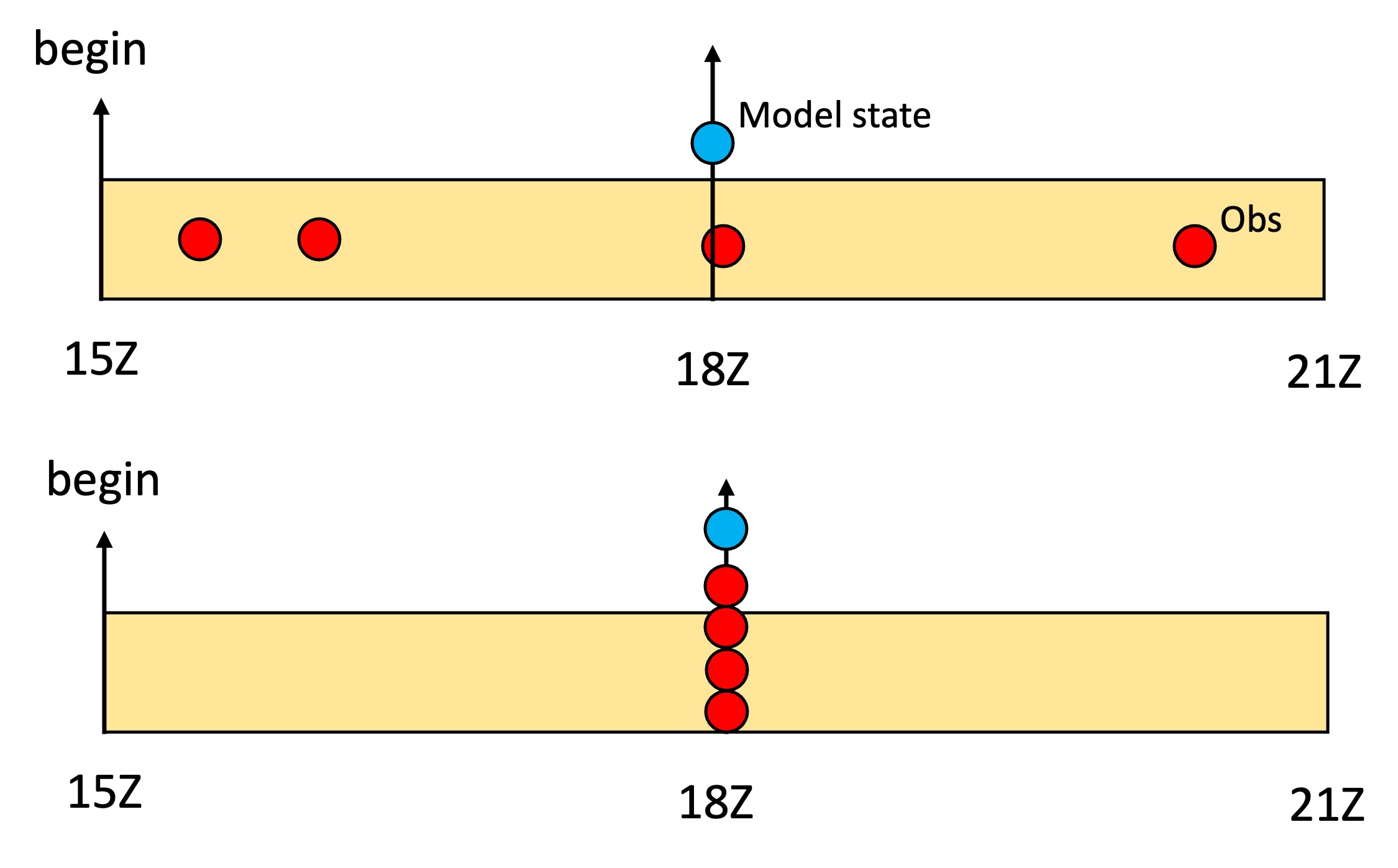
The HofX3D approach considers the model state (blue circle) valid at the middle of the assimilation window time and assumes that all observations (red circles) within the assimilation window are also valid at the same time.
In the fv3-jedi interface, the executable for the HofX3D application is fv3jedi_hofx_nomodel.x
YAML structure (HofX3D):
To run fv3jedi_hofx_nomodel.x, JEDI requires an input file (in YAML format) which specifies the assimilation window, input geometry and state information, input observation information, and the observation operator. Below is an example to run the Column Retrieval observation operation with TEMPO observation and a low resolution GEOS-CF background.
The YAML file and all the input files are available on the code repository under jedi_applications/run_hofx/hofx/.
# Beginning and length of assimilation window
time window:
  begin: '2023-08-05T15:00:00Z'
  length: PT6H

# Geometry of the state or background
geometry:
  fms initialization:
    namelist filename: inputs/geometry_input/fmsmpp.nml
  akbk: inputs/geometry_input/akbk72.nc4
  npx: 13
  npy: 13
  npz: 72

# Model state valid in the middle of the assimilation window
state:
  datetime: '2023-08-05T18:00:00Z'
  filetype: cube sphere history
  datapath: inputs/geos_cf_c12
  filename: CF2.geoscf_jedi.c12.20230805T180000Z.nc4
  state variables:
  - air_pressure_thickness
  - volume_mixing_ratio_of_no2
  - volume_mixing_ratio_of_no
  - volume_mixing_ratio_of_o3
  - air_pressure_at_surface
  field io names:
    air_pressure_thickness: DELP
    volume_mixing_ratio_of_no: 'NO'
    volume_mixing_ratio_of_no2: NO2
    volume_mixing_ratio_of_o3: O3
    air_pressure_at_surface: PS
  max allowable geometry difference: 0.1

# Observations measured within the assimilation window
# But are assumed to be valid in the middle of the assimilation window.
observations:
  observers:
  - obs space:
      name: tempo_no2_tropo
      obsdatain:
        engine:
          obsfile: inputs/obs/tempo_no2_tropo_20230805T150000Z.nc
          type: H5File
      obsdataout:
        engine:
          allow overwrite: true
          obsfile: output/fb.hofx3d.tempo_no2_tropo.20230805T150000Z.nc
          type: H5File
      observed variables:
      - nitrogendioxideColumn
      simulated variables:
      - nitrogendioxideColumn

    obs operator:
      name: ColumnRetrieval
      isApriori: false
      isAveragingKernel: true
      nlayers_retrieval: 72
      stretchVertices: topbottom
      tracer variables:
      - volume_mixing_ratio_of_no2
A few points about this YAML file:
Note that the assimilation window begins at
2023-08-05T15:00:00Zand has a length of 6h (PT6H)The model state is valid at
2023-08-05T18:00:00Zwhich is the middle of the window.If you examine the observation file (
inputs/obs/tempo_no2_tropo_20230805T150000Z.nc), you can see that it includes measurements from15Zto21Z.The observation operator is
ColumnRetrievalwhich calculates tropospheric column NO2 using averaging kernels (scattering weights x AMF for instance).The output is saved at
output/fb.hofx3d.tempo_no2_tropo.20230805T150000Z.nc. This file is a nested NetCDF in the IODA format and includes various groups includinghofxandobsValue.
Running HofX3D
All the input files for this exercise are under jedi_applications/run_hofx/hofx/ directory. So cd this directory and then you can run the application with this command:
$MPIEXEC "-n" "6" $JEDI_BUILD/fv3jedi_hofx_nomodel.x yamls/hofx_fv3-geos_cf_nomodel.yaml 2>&1 | tee log_hofx3d.txtOn Discover, you will need to run this command on an interactive node or submit it as a Slurm job. Please see here for more details.
Note: Make sure you do not load any additional modules that may conflict with the Spack Stack modules. For example, if you have any module load commands in your .bashrc or .cshrc, remove or disable them, and purge all currently loaded modules before loading the Spack Stack modules.
Examining the output of HofX3D run
In the previous command, we saved the log from running fv3jedi_hofx_nomodel.x in log_hofx3d.txt. The output log includes helpful information, such as timing statistics for all the tasks in the application. Examine and the output log and take note of the tasks that used the most computational resource.
The output file name is specified under the obsdataout -> obsfile section of the YAML file. You can examine this file using nco command ncdump.
ncdump -h output/fb.hofx3d.tempo_no2_tropo.20230805T150000Z.ncThe output file is in IODA format, and includes several groups such as MetaData, ObsValue, hofx, etc. The IODA format and IODA converters training includes more details about the IODA format.
import xarray as xr
fb_file = xr.open_datatree('hofx/output/fb.hofx3d.tempo_no2_tropo.20230805T150000Z.nc')
fb_fileCtest example
In the fv3-jedi repository, in test/CMakeLists.txt look for various H(x) test examples. For example, the ctest fv3jedi_test_tier1_hofx_nomodel uses testinput/hofx_nomodel.yaml as the YAML input and fv3jedi_hofx_nomodel.x as the executable.
ecbuild_add_test( TARGET   fv3jedi_test_tier1_hofx_nomodel
                  MPI      6
                  ARGS     testinput/hofx_nomodel.yaml
                  COMMAND  fv3jedi_hofx_nomodel.x )
Compare testinput/hofx_nomodel.yaml with the YAML file described in the example above and note the differences.